 REWIND
Vinyl Record Player App for iPhone: What It Does and Doesn't
A vinyl record player app for iPhone plays your own digital music on a drawn turntable. The tonearm tracks across the record, you can drag the platter to scratch, and optional crackle adds the surface noise of a worn groove. It does not play physical records, and the sound is not real vinyl.
Download free on iPhoneSee all 30 machines
8 machines free forever · no account · works offline
What does a vinyl player app actually do?
It reads audio files from your phone and presents them as a record on a turntable. Nothing is pressed into a groove, so the sound starts out as clean as the file. Realism comes from two layers: the moving picture and the sound treatment on top.
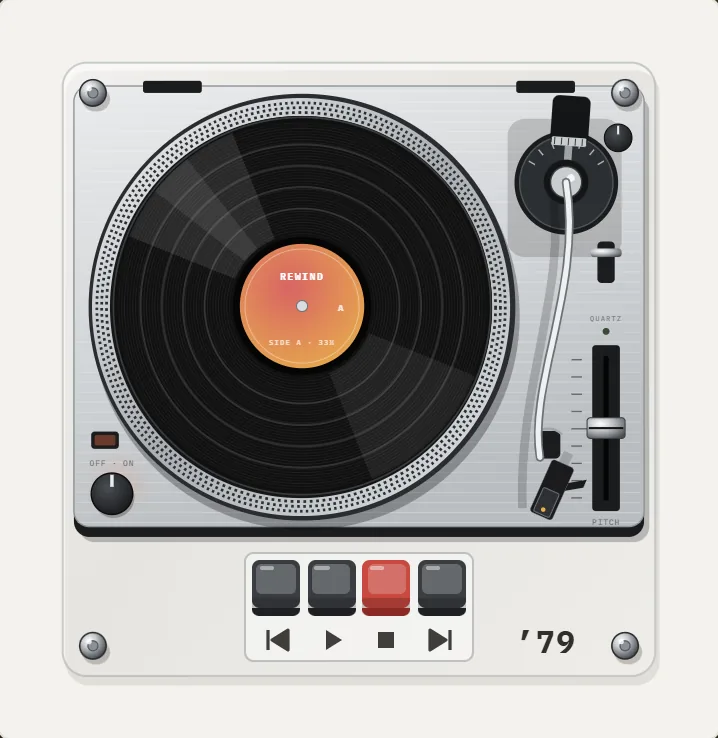
In REWIND, the tonearm moves across the record as the song plays, and you can put a finger on the platter to scratch. Crackle is a slider inside the analog sound controls, so you decide how worn the imaginary record is. The vinyl player page shows the full set of turntables.
Which turntable designs are worth knowing?
Turntables differ in how they spin the platter and how the arm tracks the groove. Those differences are visible, which is why an app can make them interesting.
REWIND has 3 turntables, one for each of these ideas.
| Machine | Year | What to look at |
|---|---|---|
| Portable suitcase player | 1968 | Seen from above, a compact player in a case |
| Linear-tracking turntable | 1972 | Tangential tonearm that slides straight across the record |
| Direct-drive DJ turntable | 1979 | Classic platter and arm layout, built for scratching |
Why do records crackle in the first place?
A stylus rides in a groove narrower than a human hair, so every speck of dust, scratch and static charge becomes a tiny jolt in the signal. Grooves also wear with play, and pressings carry microscopic imperfections from the plastic itself. The result is the pops and the low-level hiss we call crackle.
A format fact helps here. Records are mastered with an equalization curve, standardized as RIAA equalization, that cuts bass and boosts treble on the disc and reverses it in the phono preamp (Wikipedia: RIAA equalization). Undoing the treble boost also pushes surface noise down, which is part of why a clean record sounds so quiet. For the full physics, read why vinyl crackles.
Does a vinyl app make music sound like a record?
Partly. Crackle and a slight low-end warmth change the mood. Turn the effects on and a flat digital file feels more like a played object. What an app cannot do is reproduce the cartridge, the arm geometry or the particular pressing. Exact vinyl sound from a digital file is not on offer here.
The honest pitch is that the app gives your own music a ritual. Try the Warm equalizer preset, add a little crackle, and leave wobble low. Real turntables are not wobbly unless something is wrong, and a warped record or an off-center hole is a common cause when they are (Wikipedia: Wow and flutter measurement).
How do you set up a vinyl app in four steps?
This works the same way for any folder of files you own.
- Collect your music as files: purchases that came as downloads, CD rips, or digitized records. Streaming-service tracks are DRM-protected and will not import.
- In REWIND, import the folder from the Files app, as shown in how to add music files to iPhone.
- Open the catalog by tapping the year title and choose a turntable.
- Switch on analog sound, set crackle to a low value, and add warmth with the Warm preset in the equalizer.
Who should skip it?
If you want measured audiophile output, bit-perfect playback or a USB DAC chain, a different app fits better; REWIND does not claim any of that. If you want your own library on machines that look and feel like the ones in your memory, it is aimed squarely at you. Side-by-side options are on best vinyl player apps.
Cost: the app is free to download with an in-app purchase, and the vinyl turntables are part of REWIND PRO. The free tier includes 8 cassette and CD machines, the equalizer and the analog sound controls, so you can hear the crackle slider before you decide.
What is the difference between belt-drive and direct-drive?
The two drive systems explain the visual differences between machines. In a belt-drive turntable, a rubber belt links the motor to the platter, which isolates motor vibration at the cost of some speed stability. In a direct-drive turntable, the motor sits under the platter and spins it with no belt. The first direct-drive turntable went on sale in 1969. The design delivered quick start-up and stable speed, and it became a DJ standard in the 1970s (Wikipedia: Direct-drive turntable).
We compare them in detail in belt drive vs direct drive. The 1972 linear-tracking design in the app solves a different problem again: a conventional arm pivots, so the stylus meets the groove at a slight angle that changes across the record, while a tangential arm slides straight and keeps the angle constant. Read linear-tracking turntables explained for the geometry.
What should you listen for with the effects on?
Play a song with a quiet beginning and listen to the first ten seconds with crackle at three settings: off, low and high. At low, you should feel the noise as texture beneath the music. At high, it dominates and the song becomes a sound effect.
Then try wobble. A real turntable running well has very little, so a subtle setting is closer to the truth. If you want the heavily wobbly sound of a warped record, push it up knowing it is a stylistic choice. See what wow and flutter are for a sense of what the numbers mean.
Finally, try scratching. On the direct-drive turntable put a finger on the record and move it back and forth while the song plays. The point of the app is that the platter answers your hand.
Frequently asked questions
Can I play my real vinyl records with a vinyl player app?
No. The app plays digital files on your iPhone. To use records you must digitize them first, then import the audio files.
Does the app add vinyl crackle?
Yes. REWIND has a vinyl crackle slider in its analog sound controls, along with tape saturation, wobble and hiss. You can set it as low as you like or switch it off.
Can I scratch like a DJ?
You can put a finger on the record to scratch. The direct-drive turntable from 1979 is the classic layout for it.
Are the vinyl turntables free?
They are part of REWIND PRO. The free tier covers 8 cassette and CD machines plus the sound and equalizer controls.
Does it work without internet?
Yes. Playback is fully offline, and the sounds of the mechanics are generated on the device.
Keep exploring
Turntables3 turntables: suitcase, linear-tracking and direct-drive, with scratching and crackle.1979 Direct-Drive DJ Turntable for iPhoneSilver deck on rubber base, strobe-dot platter, orange lamp, S-shaped tonearm, pitch slider. A PRO ’79 DJ turntable.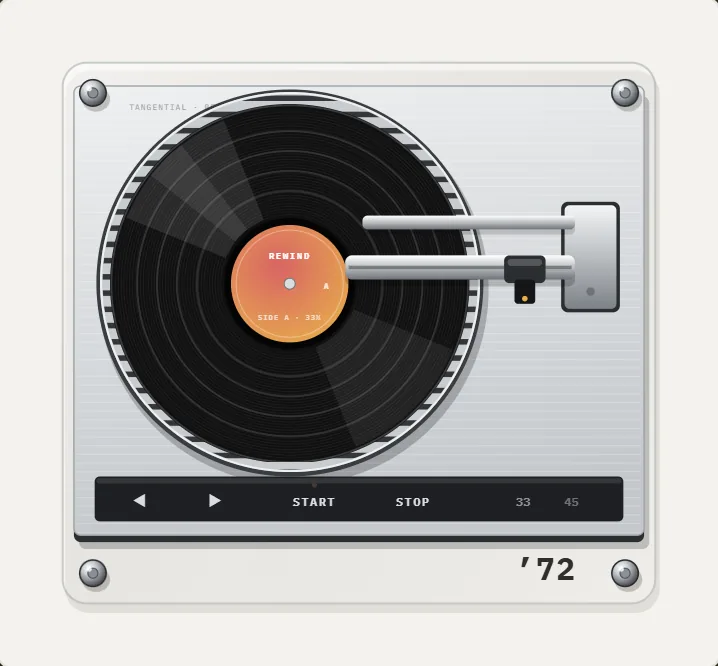 1972 Linear-Tracking Turntable App for iPhoneLow aluminum deck, ribbed platter, a tonearm carriage on two rods that glides straight. A PRO ’72 turntable.
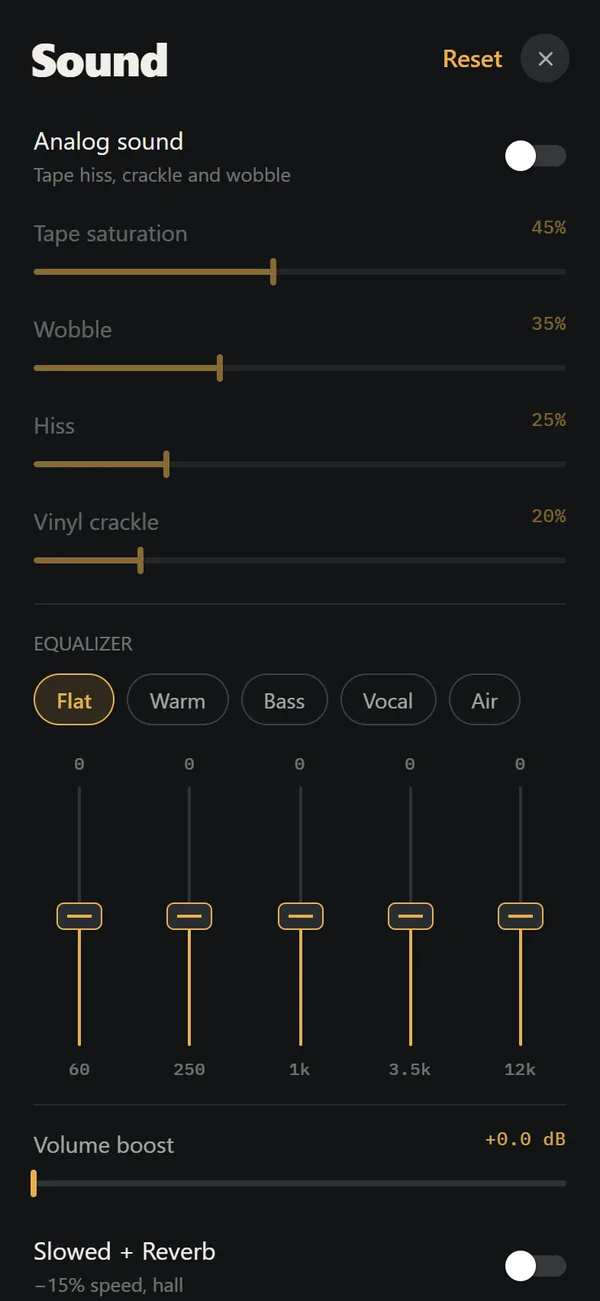 Analog Sound on iPhoneFour sliders (saturation, wobble, hiss, crackle), automatic machine sound and a lo-fi radio filter, live on your own files. Free.Best Vinyl Record Player Apps for iPhoneSix vinyl record player apps for iPhone compared on price, music sources, features and App Store ratings, October 2026.
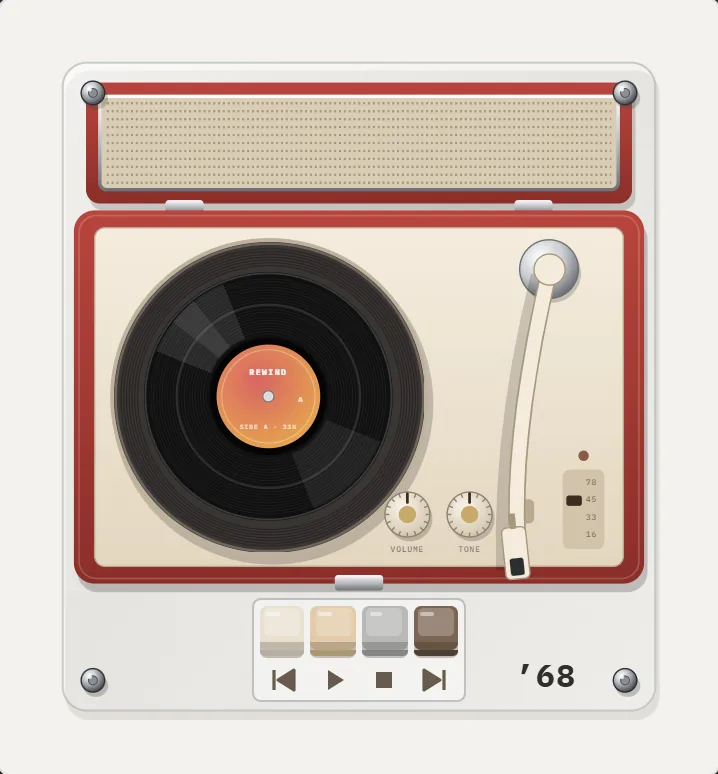 Why Vinyl CracklesThe physical reasons vinyl crackles, how a stylus reads a groove, and how to add or avoid the sound.