 REWIND
Best EQ settings for headphones on iPhone: a five-band starting guide
Start flat, then make small moves. On a five-band equalizer with bands at 60 Hz, 250 Hz, 1 kHz, 3.5 kHz and 12 kHz, raise 60 Hz for weak bass, cut 250 Hz for mud, lift 3.5 kHz for clearer vocals, and trim it when sound is harsh. Keep each change under 4 dB.
Download free on iPhoneSee all 30 machines
8 machines free forever · no account · works offline
What are good starting EQ settings?
There is no single best setting, because every pair of headphones and every ear is different. The table gives starting points in decibels for the five bands in REWIND's equalizer. Treat them as a first guess, then adjust by ear.
The numbers are decibels relative to flat, so 0 means untouched. Moves of 1 dB are subtle and 3 dB is clearly audible. Acoustic and classical music often needs the least help, while bass-heavy styles such as hip hop and electronic music usually take the 60 Hz boost best. These are suggestions to react against, not rules, and if your headphones already sound right, leave the bands where they are.
| Problem or goal | 60 Hz | 250 Hz | 1 kHz | 3.5 kHz | 12 kHz |
|---|---|---|---|---|---|
| Flat reference | 0 | 0 | 0 | 0 | 0 |
| Thin bass (small earbuds) | +3 | +1 | 0 | 0 | 0 |
| Boomy or muddy | -2 | -3 | 0 | 0 | +1 |
| Harsh or sibilant | 0 | 0 | 0 | -3 | -1 |
| Dull or dark | 0 | 0 | 0 | +2 | +3 |
| Vocals and podcasts | -2 | -1 | +1 | +3 | 0 |
| Quiet late-night listening | +3 | +1 | 0 | 0 | +1 |
| Old 128 kbit/s MP3s | 0 | 0 | 0 | -1 | 0 |
What does each of the five bands do?
Each band moves a region of the spectrum. Knowing the region helps you fix a problem instead of guessing.
- 60 Hz: the weight of kick drums and bass notes. Too little sounds thin; too much sounds boomy and hides vocals.
- 250 Hz: body and warmth, but also mud when it builds up in dense mixes.
- 1 kHz: the core of the midrange. Too much can sound nasal or honky; too little makes music distant.
- 3.5 kHz: presence, where the ear is most sensitive. It brings out vocal consonants and snare crack, and it is where harshness and sibilance live.
- 12 kHz: air and shimmer, cymbals and breath. Too much brings out hiss and brittleness.
How do you dial in your own headphones?
Prefer cutting to boosting where you can. Raising a band increases the overall level, and a loud track can clip, which sounds worse than any tone problem. Lowering the neighboring bands or the volume avoids that.
- Pick one track you know very well, ideally a lossless file, and play it at your usual volume.
- Set the equalizer flat and listen for the single biggest problem: thin, boomy, harsh, dull.
- Move one band by 2 dB toward the fix. Stop as soon as the problem is gone.
- Toggle the EQ off and on to compare. If the off version sounds better, you went too far.
- Listen to two or three other tracks, then take the setting back a little. A setting that suits one song often damages another.
Why do the best settings change with volume?
Because the ear changes. Harvey Fletcher and Wilden Munson showed in 1933 that sensitivity to different frequencies depends on level, and the later ISO 226 equal-loudness standard (revised in 2003) refined it. The equal-loudness contour article has the details. In practice, quiet listening loses bass first, which is why the late-night row above boosts 60 Hz a little.
Headphone type matters too. Earbuds that seal in the ear canal give more bass than loose ones, so a seal check often fixes thin sound faster than any EQ. Over-ear closed models differ again. Many listeners like a little extra bass on headphones, but preferences vary widely, so trust your own ears over any chart.
Does the file format change the EQ?
It can. A 128 kbit/s MP3 is about 11 times smaller than CD audio, and the encoder discards detail, often leaving little content above roughly 16 kHz. Boosting 12 kHz on such a file lifts artifacts and hiss, not sparkle, which is why the old-MP3 row leaves it alone. Lossless FLAC or ALAC files give an EQ more to work with. See our pages on MP3, FLAC and ALAC.
Also keep EQ separate from effects. A warm tape sound is a different tool from tone shaping, and we explain it in why old music sounds warm.
What mistakes should you avoid?
- Boosting every band, which only makes the track louder and more distorted.
- Big bass boosts that hide vocals. If vocals feel buried, cut 250 Hz before you push 3.5 kHz.
- Never going back to flat. Reset the EQ now and then, because your ears adapt.
- Judging at the wrong volume. Set a normal listening level first, then adjust.
How does this work in REWIND?
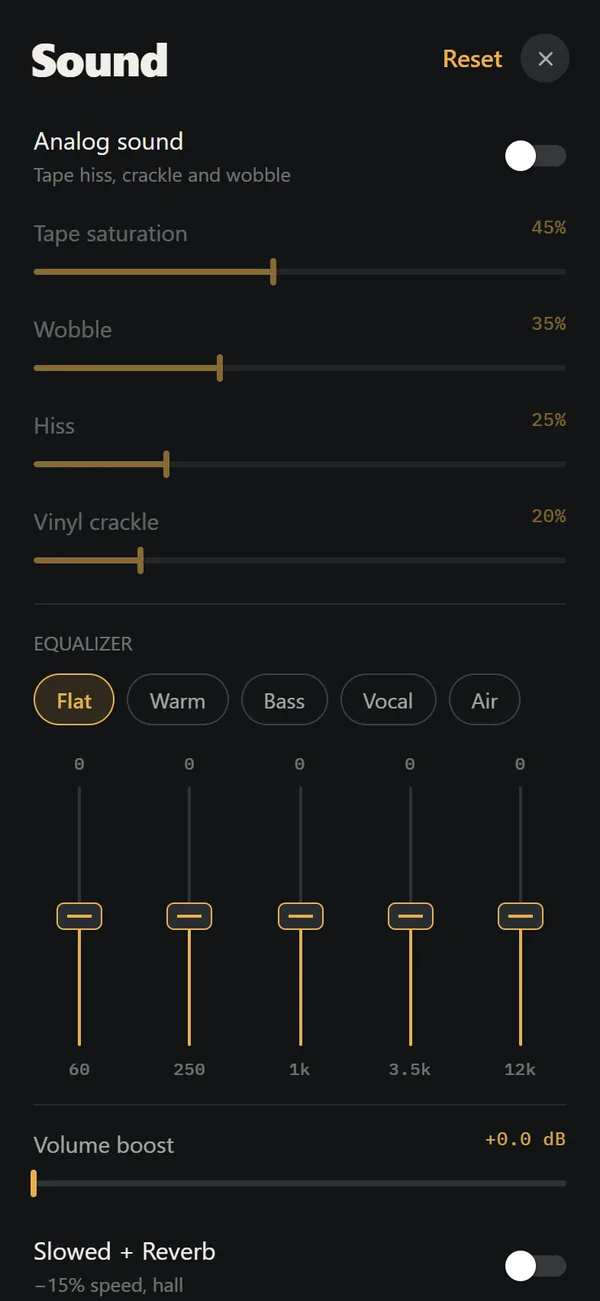
REWIND's equalizer has exactly the five bands used here (60 Hz, 250 Hz, 1 kHz, 3.5 kHz and 12 kHz) and presets named Flat, Warm, Bass, Vocal and Air. Pick the preset closest to your goal, then nudge single bands. The sound is processed on the phone in real time, so changes apply right away, and playback works offline. The separate Analog Sound switch adds tape saturation, wobble, hiss and crackle on top. Read more on the equalizer page and the analog sound page, and see how the app works offline.
Frequently asked questions
What is the best EQ setting for bass on headphones?
Raise 60 Hz by about 2 to 3 dB and 250 Hz by 1 dB. If it turns boomy, pull 250 Hz down first. Keep the changes small and compare against flat.
How do I make vocals clearer?
Lift 3.5 kHz by about 2 to 3 dB and cut 250 Hz by 1 dB. If consonants turn harsh or sibilant, reduce 3.5 kHz again.
Should I boost the treble at 12 kHz?
Only on high-quality files. Low-bitrate MP3s have little content up there, so boosting mostly raises hiss and artifacts.
Why does music sound thin at low volume?
The ear is less sensitive to bass at low levels, as the equal-loudness measurements show. A small boost around 60 Hz for quiet listening can help.
Does REWIND have an equalizer?
Yes. REWIND has a five-band equalizer at 60 Hz, 250 Hz, 1 kHz, 3.5 kHz and 12 kHz, with presets Flat, Warm, Bass, Vocal and Air. It is free.
Keep exploring
5-Band Equalizer for iPhone Music Files, FreeFive bands (60 Hz to 12 kHz) and five presets, applied in real time to your own files. Free.Analog Sound on iPhoneFour sliders (saturation, wobble, hiss, crackle), automatic machine sound and a lo-fi radio filter, live on your own files. Free. Why Old Music Sounds WarmTape saturation, vinyl limits, tube harmonics and the ear itself: the causes of warm sound, and how much of it is taste.
 FLAC on iPhoneFree lossless audio. Sizes, loading FLAC on iPhone, and what REWIND does and does not promise.
 Slowed and Reverb Any Song on iPhone, LiveWhat slowed and reverb is, where the style came from, and how to apply it live to your own music on iPhone.
 Offline Music Player for iPhone, No AccountNo network, no account, no ads, no tracking. Your files stay on the iPhone.